XGS Silicon
os-theme-xgs · Look
XGS Silicon, a theme for the OPNsense web GUI in light, dark and one that follows the browser's setting.
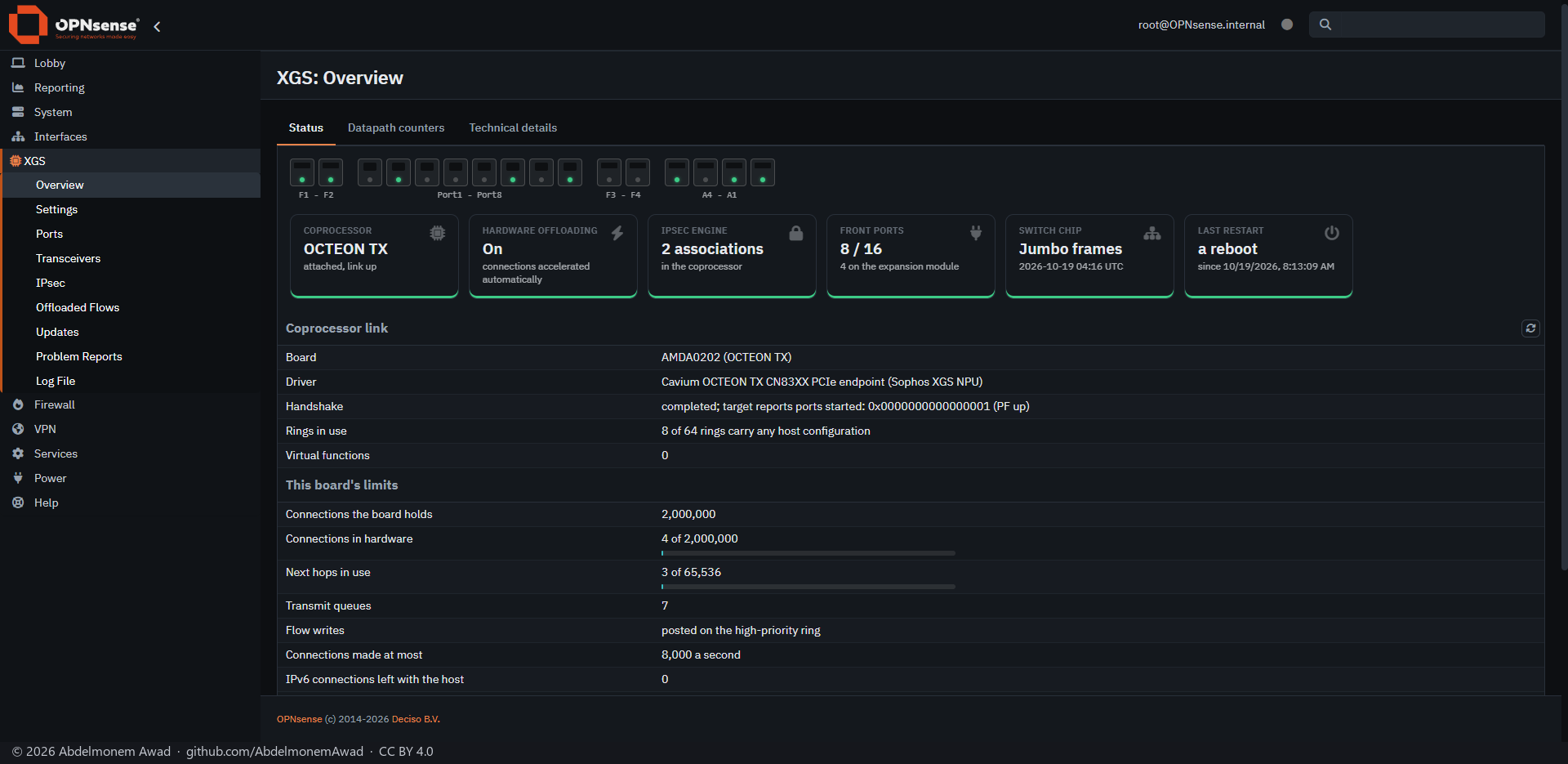
The bar along the top and the menu are carbon in both modes, as the chassis is; copper marks what you act on, teal the data path. The type is IBM Plex, Latin and Arabic from one family, carried inside the theme so that a GUI opened without internet looks the same.
It changes colour, type and corners, not layout: the text keeps OPNsense's 18 px line, so no form or table moves. Everything else is OPNsense's own theme, unchanged.
It is built on OPNsense's opnsense and opnsense-dark themes, and can be derived again from a newer OPNsense's theme directory, keeping its own files.
Features
-
Three themes
xgs is light, xgs-dark is dark, and xgs-auto follows the browser's light or dark setting and switches when it changes.
-
Measured contrast
Every text colour reads at 4.5:1 or better on every surface the theme puts it on.
-
Fonts inside
IBM Plex Sans, IBM Plex Sans Arabic and IBM Plex Mono, about 660 KB, are in the theme; nothing is fetched from a font service.
-
What it restyles
The bar and the menu, tabs, tables, buttons, form fields, alerts, dialogs, the login page, the dashboard's widgets and the summary cards of the appliance's own pages.
-
Arabic, right to left
With opnsense-rtl installed, mirrored copies of its stylesheets are made. In Arabic the line is taller and letter spacing is off, because spacing breaks the joins between letters.
Install and update
On a Sophos XGS appliance it comes with the image from xgs-image-builder, and xgs-auto is the GUI's theme; another is a choice in System: Settings: General. It is not on the Plugins tab of XGS: Updates and has no updater of its own. Anywhere else, run install/install.sh from a copy of the repository, then choose it in System: Settings: General: Theme, or run install/enable.sh xgs-auto. The themes live in OPNsense's theme directory, which OPNsense updates do not touch; install/uninstall.sh removes them and puts OPNsense's own theme back first if one of them is in use.
Limits, and what is not tested yet
- Checked page by page only on the login page, the dashboard and the coprocessor's Overview and Settings; the GUI's other pages have not been.
- An image built with the theme and booted has not been checked yet.
Repository
First release: 2026-10-20
The discussion of this page is held in the project's GitHub Discussions. Showing it here loads giscus from giscus.app and GitHub, and writing in it needs a GitHub account - what that means.