An image from the builder on the XGS 136: installed, updated, its configuration restored. 2026-10-21
The XGS 136 was installed clean from an image of the image builder and used as an owner would use it: first boot, then an update of OPNsense from the GUI, then the configuration taken before the reinstall restored. It is the second appliance an image from the builder has been installed on, after an XGS 3300 on 2026-10-16, and the first of the ARMADA family.
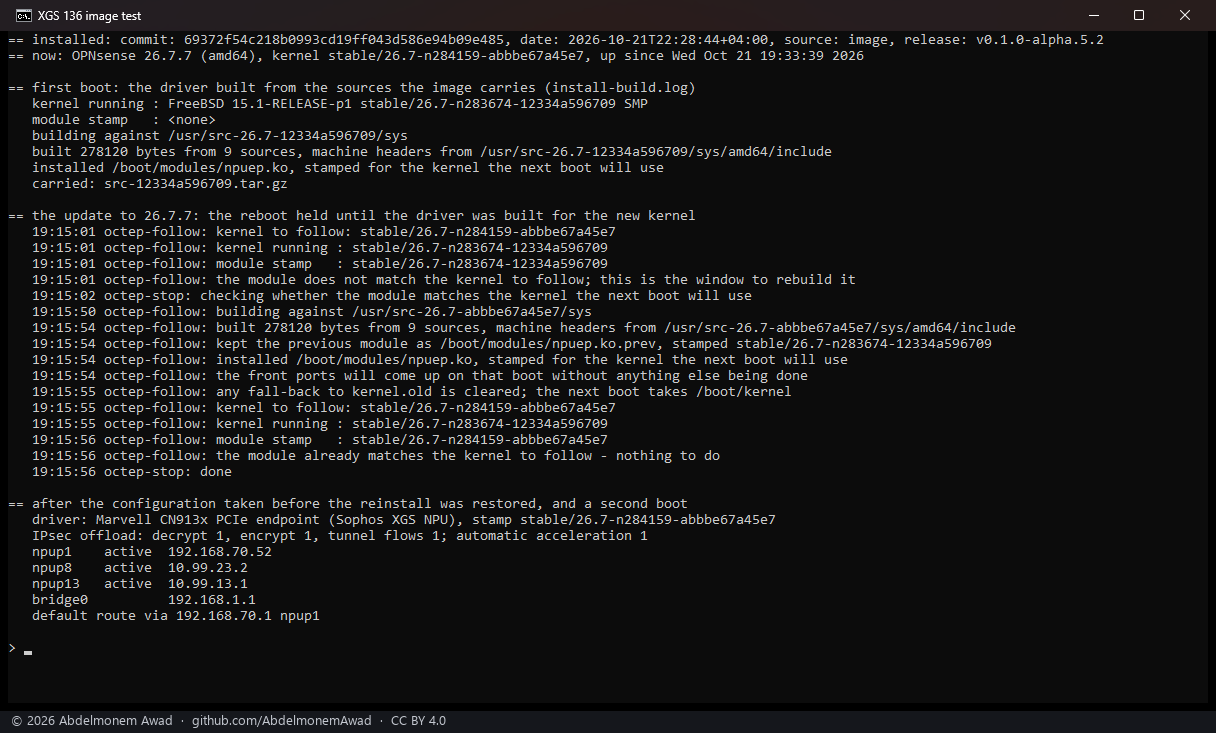
The image
- Built on the builder's page on 2026-10-21 at 18:31 UTC: OPNsense 26.7, serial console at
115200, with os-xgs-npu v0.1.0-alpha.5.2 (
69372f5) and the plugins. /usr/local/share/os-xgs-npu/installed.jsonon the appliance:source: image,release: v0.1.0-alpha.5.2.
First boot
- The front ports came up at the first boot, with no network needed for it: Port1, the WAN, took
its address by DHCP, the LAN bridge answered at
192.168.1.1, and the console menu listed every port by its label on the chassis. - The driver was built at the first boot from the kernel sources the image carries
(
kernel-sources/src-12334a596709.tar.gz, for OPNsense 26.7's kernelstable/26.7-n283674-12334a596709):built 278120 bytes from 9 sourcesininstall-build.log.
The update, as an owner does it
The owner pressed Update in System: Firmware, which took OPNsense from 26.7 to 26.7.7 and the
kernel from 12334a596709 to abbbe67a45e7. Watched from outside, reading only
(images/deploy/watch-update.sh), and from the appliance's own log afterwards:
| UTC | what |
|---|---|
| 19:12:57 | the update starts (opnsense-update) |
| 19:14:38 | the new kernel is on disk |
| 19:15:01 | the five-minute tick of the kernel follower finds it, and starts fetching its sources over the WAN |
| 19:15:02 | the update asks for its reboot; the stop hook (rc.syshook.d/stop/20-octep) holds it |
| 19:15:50 | the sources are in; the build starts |
| 19:15:54 | the driver built and installed for the new kernel, the one before kept as npuep.ko.prev |
| 19:15:56 | the stop hook finds the driver matching the next boot's kernel, and the reboot goes on |
The reboot waited 54 seconds. The appliance came back on the new kernel with the driver attached, the WAN up and the internet reachable. Nothing was done by hand.
The configuration restored
The configuration taken just before the reinstall - every interface, the lab's addresses and routes, the certificate, SSH, the XGS settings and the plugins' - was put back as System: Configuration: Backups does it, and the appliance rebooted.
- Back at the first boot: the addresses of the lab's links on Port8 and F1, the
Let's Encrypt certificate of the web GUI, SSH, and the XGS settings applied while running:
automatic acceleration on (
dev.npuep.0.flow.auto: 1), the anomaly watch running. - Back at the second boot only: the settings the driver reads when it attaches - IPsec offload
and tunnel flows. OPNsense writes them into
/boot/loader.confduring the boot, after the loader has read the file before it. After the second boot: decrypt 1, encrypt 1, tunnel flows 1 (669). Fixed the same evening: the early hooks now put the configuration's values into the kernel environment just before they load the driver, so they are taken at the first boot - measured on this XGS 136 and on the XGS 3300, each booted with the driver's lines taken out of/boot/loader.confas a restore leaves it. - Not in the configuration, so new after a reinstall whatever is restored: the appliance's
anonymous identity (
/var/db/os-xgs-npu/appliance-id: counted on the site as a new appliance), the SSH host keys (/conf/sshd: a client that knew the appliance warns of a changed key), the problem reports, and the host's key for the management link (/root/npu/id_ed25519_npu). - A plugin installed from OPNsense's own catalogue (here
os-acme-client) is named in the configuration's plugin list and is not installed by a restore.
Found on the way
- The management link was never trusted on an image install (668). Putting the host's key on the coprocessor had been a step done once by hand, so every read of the coprocessor - PoE, the transceivers, health - went over its 115200 console one at a time, and the Ports page's PoE card showed "the coprocessor's console is busy with another command". A fix is on that issue, tested on this appliance.
- XGS: Ports' errors and drops read "Not available on this appliance" on the XGS 136 by design since 2026-10-20: reading its switch makes the coprocessor's network agent report linked ports down (639).
The discussion of this page is held in the project's GitHub Discussions. Showing it here loads giscus from giscus.app and GitHub, and writing in it needs a GitHub account - what that means.