XGS 136
ARMADA · CN9131 · 14 front ports: 12 RJ45, 2 SFP · run here
Run here
This project's drivers and plugin have been run on the XGS 136 in the lab: every front port, the flows and IPsec in the coprocessor. Every number taken on it is in the measurements, and the appliance itself, photographed part by part, on its hardware page.
XGS 136w: the same board with Wi-Fi - added, untested.
At a glance
| model | board | state |
|---|---|---|
| XGS 136 | AMDA0201-0003 |
run here |
| XGS 136w | AMDA0201-0004 |
added, untested |
The ARMADA family, driven by npuep: 14 front ports (12 RJ45, 2 SFP), the interfaces npup1 to npup14, and the internet on Port1 when the first boot sets the appliance up by itself.
Reported by appliances of this model
14 problem reports have come from appliances of this model on their own, the first on 2026-10-18 and the last on 2026-10-21 - so the plugin runs on at least one. See them.
What they were about: driver 2, kernel-panic 2, log-error 9, unexpected-reset 1.
The back panel, where the ports are
behind the 88E6193X switchon the coprocessor itselfPoE
Drawn from the appliance here: the places and the labels are its own.
Every port
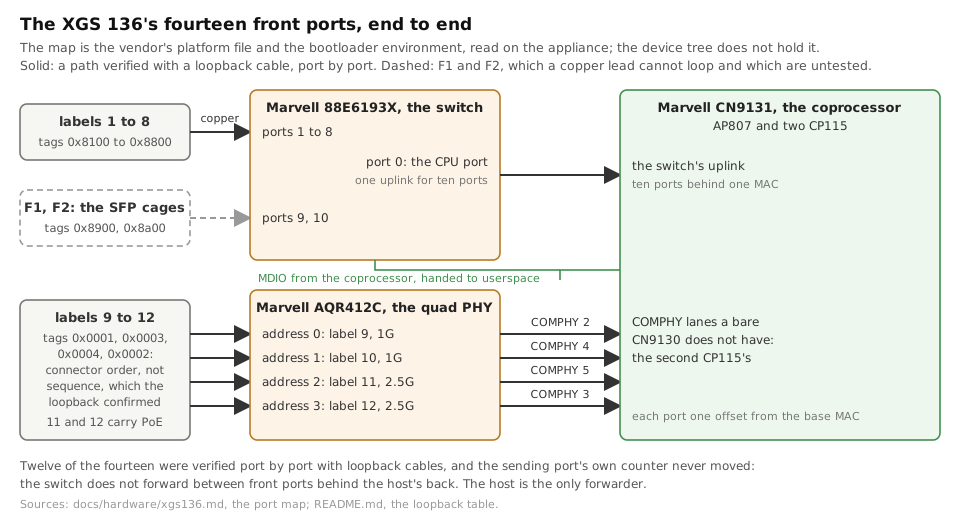
In the order of the host's interfaces, npupN. The tag is the coprocessor's name for the port, which the driver uses; a port behind the switch reaches the coprocessor through the switch's one link to it.
| label | socket | speed | interface | tag | attached to | |
|---|---|---|---|---|---|---|
| Port1 | RJ45 | 1G | npup1 |
0x8100 |
switch port 1 | |
| Port2 | RJ45 | 1G | npup2 |
0x8200 |
switch port 2 | |
| Port3 | RJ45 | 1G | npup3 |
0x8300 |
switch port 3 | |
| Port4 | RJ45 | 1G | npup4 |
0x8400 |
switch port 4 | |
| Port5 | RJ45 | 1G | npup5 |
0x8500 |
switch port 5 | |
| Port6 | RJ45 | 1G | npup6 |
0x8600 |
switch port 6 | |
| Port7 | RJ45 | 1G | npup7 |
0x8700 |
switch port 7 | |
| Port8 | RJ45 | 1G | npup8 |
0x8800 |
switch port 8 | |
| Port9 | RJ45 | 2.5G | npup9 |
0x0001 |
the coprocessor's CP0 eth2, through the AQR412C | |
| Port10 | RJ45 | 2.5G | npup10 |
0x0003 |
the coprocessor's CP1 eth1, through the AQR412C | |
| Port11 | RJ45 | 2.5G | npup11 |
0x0004 |
the coprocessor's CP1 eth2, through the AQR412C | PoE |
| Port12 | RJ45 | 2.5G | npup12 |
0x0002 |
the coprocessor's CP1 eth0, through the AQR412C | PoE |
| F1 | SFP | 1G | npup13 |
0x8900 |
switch port 9 | |
| F2 | SFP | 1G | npup14 |
0x8a00 |
switch port 10 |
The board
Two computers in one box: the host runs OPNsense and reaches a front port only through the coprocessor, which owns them all. The links and the MACs are the vendor's board file's and device tree's, and were read on this appliance.
Technical details
| part | detail | source |
|---|---|---|
| host | AMD Ryzen Embedded R1606G, 4 threads, 8 GB | read here |
| host to coprocessor | PCIe 11ab:7080, Gen3 x4 | read here |
| coprocessor | CN9131 (AP807 + two CP115) | board file |
| switch | 88E6193X · its link: CP0 eth0, 10GBASE-KR | device tree |
| PHYs on the coprocessor's own ports | AQR412C | board file |
| the vendor's platform | xgsdt2-126136 |
board file |
| storage | 64 GB SSD | datasheet |
| console and management | COM (RJ45), Micro-USB | datasheet |
| other ports | USB 2.0, USB 3.0 | datasheet |
| module slots | 1 | datasheet |
| Wi-Fi | Wi-Fi 5, 3x3 (XGS 136w) | datasheet |
| PoE | 2 x 2.5 GE, 30 W a port | datasheet |
| form | desktop · 320 x 44 x 213 mm · 2.4 kg | datasheet |
| power supply | external · 150 W | datasheet |
| power drawn | XGS 136: 30 W idle, 62 W at most XGS 136w: 32 W idle, 65 W at most |
datasheet |
Expansion modules
Its bay is the host's, not the coprocessor's: the vendor sells 3G/4G, 5G, Wi-Fi (136w) for it. None has been fitted here, and none goes through the coprocessor.
The vendor's figures
As the vendor's datasheet prints them; not measured here. Its stated method is Keysight-Ixia BreakingPoint under ideal conditions; the MTU, the ports and whether a figure counts both directions are not stated. What was measured on it, with how and what it does not show: the measurements.
| edition 2024-11 | edition 2022-08 | |
|---|---|---|
| Firewall | 11,500 Mbps | 11,500 Mbps |
| Firewall IMIX | 6,500 Mbps | 4,700 Mbps |
| Firewall latency (64-byte UDP) | 8 µs | 8 µs |
| IPS | 4,000 Mbps | 3,300 Mbps |
| Threat protection | 3,000 Mbps | 1,000 Mbps |
| NGFW | 3,000 Mbps | 3,000 Mbps |
| Concurrent connections | 6,400,000 | 6,400,000 |
| New connections a second | 74,500 | 74,500 |
| IPsec VPN | 6,350 Mbps | 4,800 Mbps |
| IPsec VPN tunnels | 2,500 | - |
| SSL VPN tunnels | 1,500 | 1,500 |
| TLS inspection | 950 Mbps | 950 Mbps |
| TLS inspection connections | 18,432 | 18,432 |
Photographed
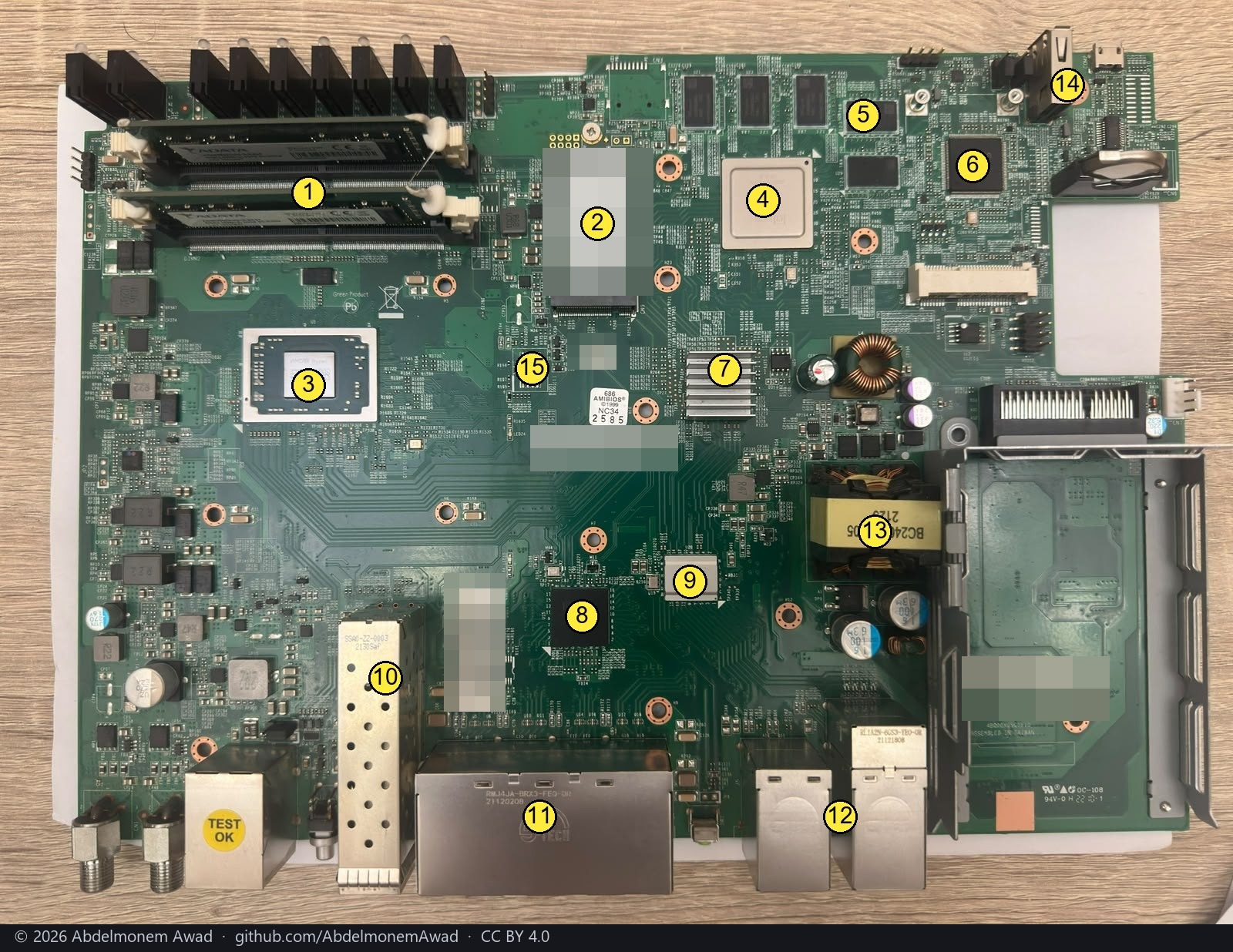
The board part by part, and how each part was read: the hardware page; the same, drawn: the drawing.
If you have one
Install it and it runs as this page says. Ten minutes after its first boot, portcheck.py holds the ports above against what its coprocessor reports and, with problem reports on, files the answer - which is what confirms this page or corrects it. Or say what works yourself: report your appliance.
Where each fact was read
- the vendor's board files:
xgs-bsp/data/<assembly>.txt, the vendor's board file (GPL release, SDK 10.22.03) - the vendor's device tree:
sdk-ext-sophos patches dt1, dt2 and dt2-138, the vendor's device trees - the vendor's board files:
xgs-check-uboot-version.sh, the vendor's map of assembly to platform - read here: the XGS 136 run here
- the vendor's datasheet: the vendor's XGS 126(w)/136(w) page, brochure edition of 2024-11, a reseller's copy
- the vendor's datasheet: the vendor's XGS 126/136 one-pager of 2022-08, a reseller's copy
The discussion of this page is held in the project's GitHub Discussions. Showing it here loads giscus from giscus.app and GitHub, and writing in it needs a GitHub account - what that means.