A block list that cuts the connections already open, measured, 2026-10-19
XGS: Settings - Cut open connections when listed. A block list in OPNsense is an alias - a pf
table filled from a URL, a feed or by hand - and a rule that blocks it blocks new connections only. A
connection opened before its address was listed keeps its pf state, and with offloading on its flow in
the coprocessor, for as long as it carries traffic. With a list chosen here,
scripts/xgs/lists_cut.py compares it every minute (cron) and when the settings are saved with what
it held before, and kills by id every pf state with either end in what was added; each driver then
takes the connection out of hardware. Choosing a list cuts what it already names.
How it was measured
On each appliance, an empty test alias, xgs_lists_test, made and watched by
images/deploy/lists-test.php and removed afterwards. One iperf3 stream, made in hardware; at second
10 the far end's address added to the alias's table with pfctl -t xgs_lists_test -T add - what a
list's refresh does. With now the cut was run at once, as saving the settings page runs it; with
cron nothing was run, and the minute's cron entry had to find it. What still arrived was read
where the traffic ends, and the stream's own two-second intervals say when it stopped. Run by
images/deploy/lab-lists-cut.sh, each in a window of its own, photographed.
- XGS 136: the bench PC on its LAN, through the 136 to the second XGS 3300 behind Port8, read on
the 3300's Port8. Driver
c9e4efb4. - XGS 3300: the bench PC on F1, through the second XGS 3300 out of F2 to the bench VM, read on the VM. The driver it loaded at its boot of 2026-10-18 14:53 UTC; the module file was rebuilt since by the deploy, without a reboot.
Both with os-xgs-npu at f8aef39.
Results
| appliance | the cut | listed at | cut | the stream | delivered afterwards | in the flow table after |
|---|---|---|---|---|---|---|
| XGS 136 | now | second 10 | 6 states at once | 917 Mbit/s, then 115 in the two seconds of the cut, then nothing | 0 Mbit/s (seconds 13 to 23) | 0 |
| XGS 136 | cron | 02:43:00 | 4 states at 02:44:00, the next minute | 490 to 675 Mbit/s for sixty seconds, 186 in seconds 70 to 72, then nothing | 0 from second 72 | 0 |
| XGS 3300 | now | second 10 | 4 states at once | 4.33 Gbit/s, then 1.77 in the two seconds of the cut, then nothing | 0 Mbit/s (seconds 13 to 23) | 1 |
| XGS 3300 | cron | 02:48:26 | 6 states at 02:49:00, 34 s later | 4.2 to 4.7 Gbit/s, 2.01 in seconds 44 to 46, then nothing | 0 from second 46 | 0 |
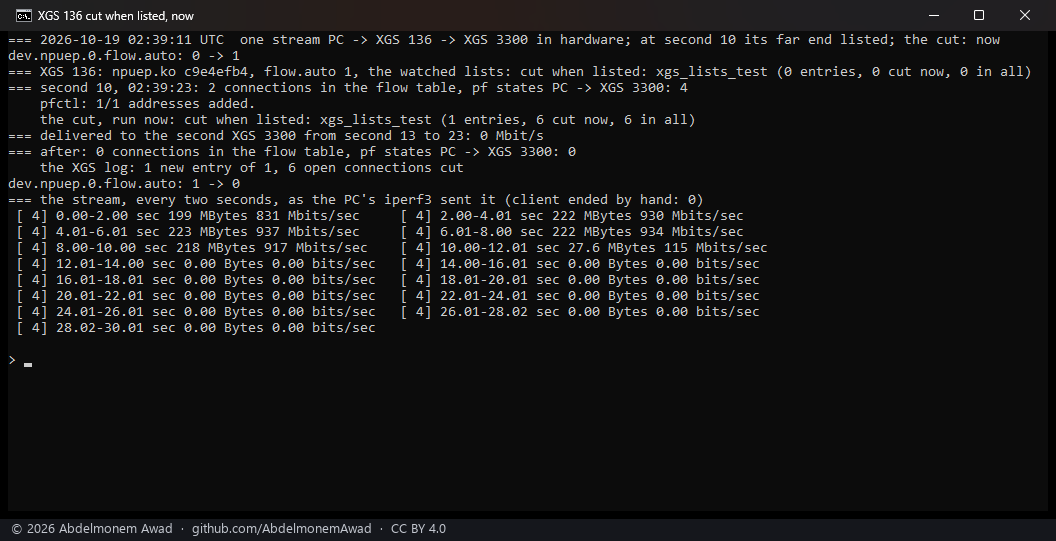
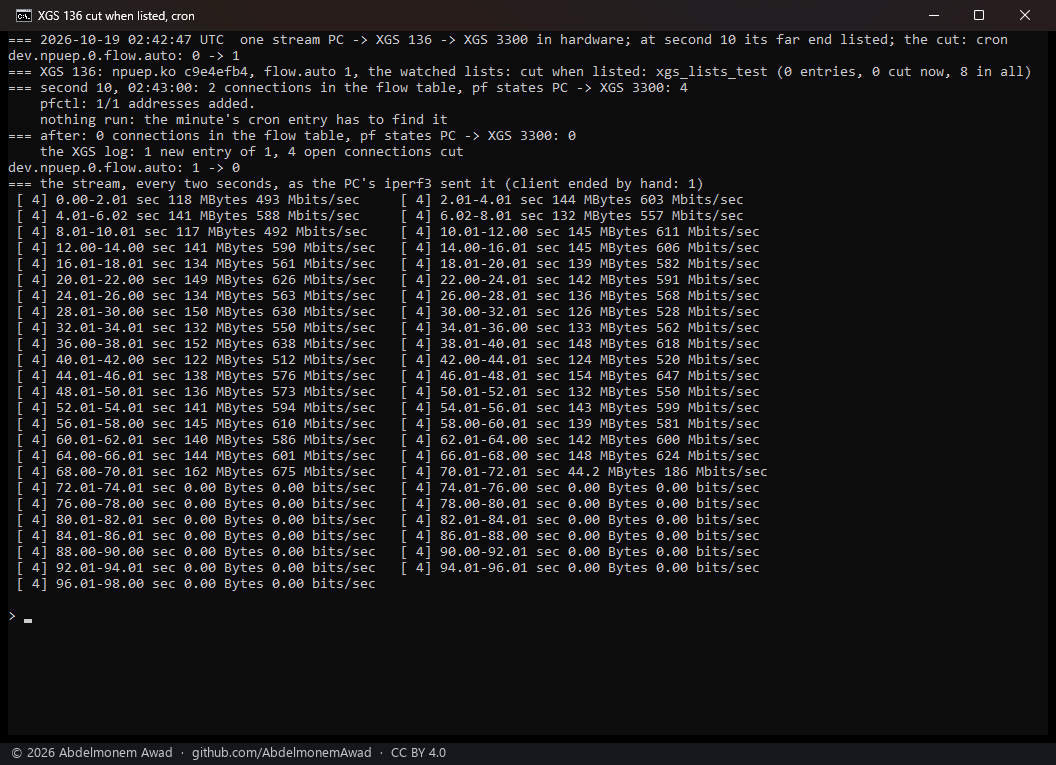
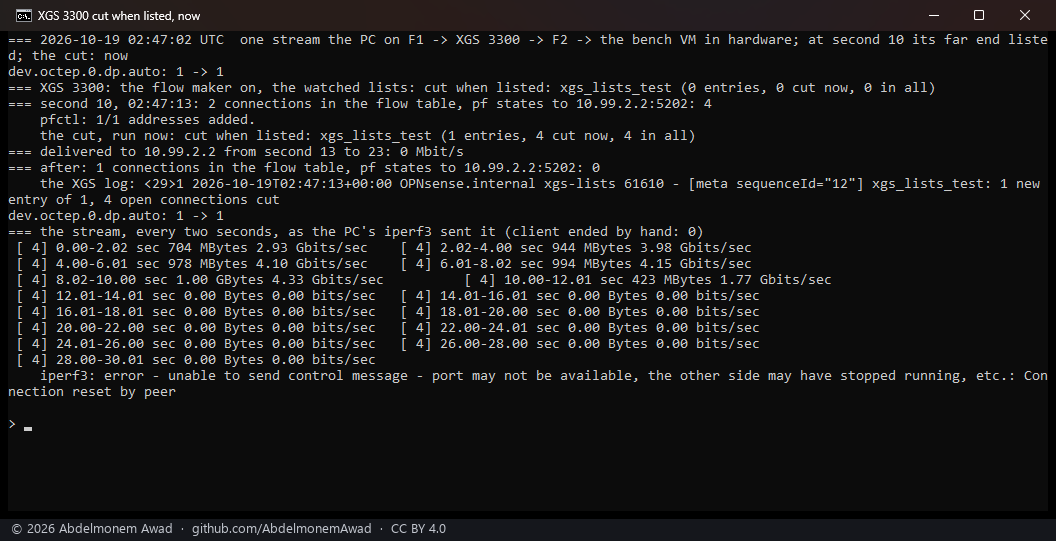
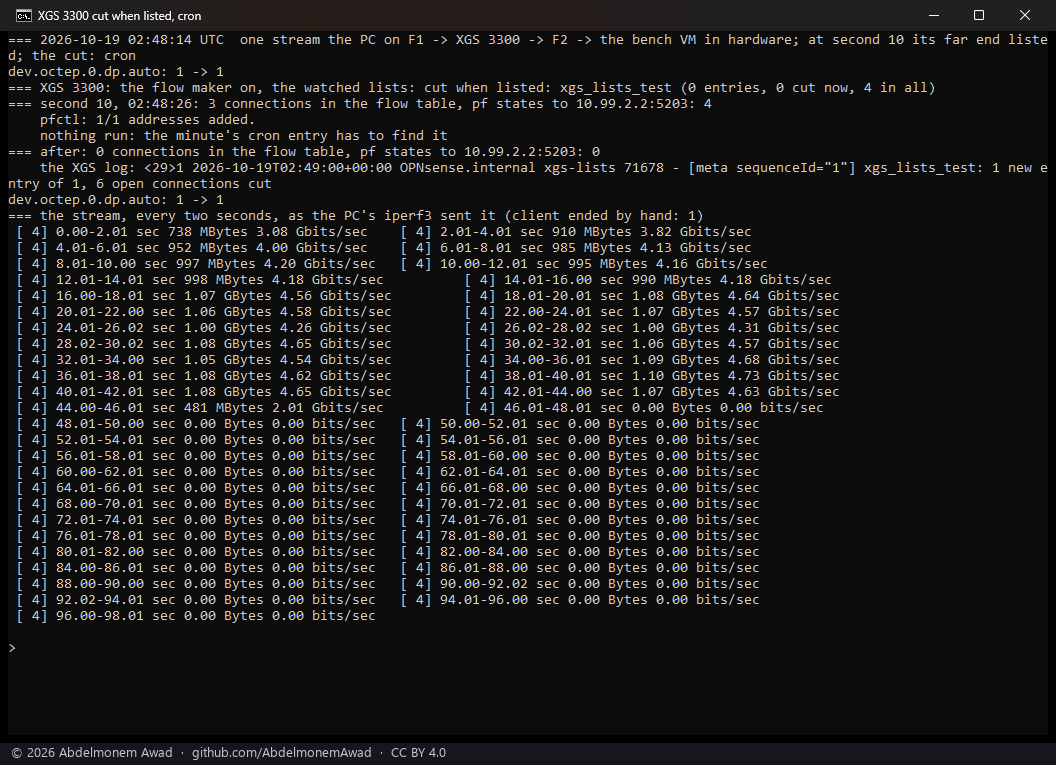
- Both appliances let the connection go with its state. A stream in hardware stopped within the two seconds its address was listed in, and nothing more reached the far end. On the XGS 136 that is the takeout fixed the day before (the finding); on the XGS 3300 it is the first measurement of a killed state there.
- Through cron the wait is up to a minute: 60 s on the XGS 136, where the address was listed on the minute, 34 s on the XGS 3300. A list is refreshed on its own schedule - an hour, a day - so a minute is small beside it; saving the settings page cuts at once.
- Every state with the listed address is cut, not only the stream's: its two connections - the data and iperf3's control - had four states at second 10, a state on each interface they cross, and the others cut held the same address; which connections they were, the runs do not say.
- Not looked into: in the XGS 136's cron run the stream ran at 490 to 675 Mbit/s rather than the link's ~930 of the run before it; and on the XGS 3300 the flow table still counted one connection 27 s after the cut, with no state left for it. Neither changed what arrived.
- A first cron run on the XGS 136 never started its stream: the run before had been cut mid-test and left its iperf3 server holding the port, which the script then failed to end. Its photograph was not kept; the script ends that server by its own command line now.
The discussion of this page is held in the project's GitHub Discussions. Showing it here loads giscus from giscus.app and GitHub, and writing in it needs a GitHub account - what that means.