Plan: the front ports assign themselves at the first boot, with a countdown
Written 2026-10-13, to be implemented in the order below. Nothing on this page is in the tree
yet. Implemented on 2026-10-16 - see What was built, which says where it
differs from the plan below.
What was built
src/etc/rc.syshook.d/early/30-xgs-assign, src/opnsense/scripts/xgs/assign.php and
src/opnsense/scripts/xgs/countdown.py, installed on both boards by install/install.sh.
- When. At a boot that has front ports and no mark in
/conf/os-xgs-npu-assign, after the bring-up hooks and beforerc.bootup. The installer copies/confto the disk, so the question is asked once. A freshly installed appliance meets it at the first boot of its disk: the live boot from the stick has no driver yet, so OPNsense's own assignment runs there as it always did. - Only on a box nobody has set up. If one front port is assigned already, the hook marks the box and changes nothing - so installing or updating this on an appliance in service is safe. This is stricter than rule 1 below, which would have filled the gaps on a box set up by hand.
- The names. On the XGS 3300 from the driver, as rule 6 asks, but without a new sysctl: octep already names every front port in its interface description from the port's tag ("XGS front port Port2"), and OPNsense replaces that only when it assigns the port. Nothing is printed beside the XGS 136's sockets, so its ports are numbered as npuep numbers them: npupN is PortN for 1 to 12, npup13 and npup14 are F1 and F2.
- The addresses (2026-10-17, his decision). The LAN - bridge0, which is
lanon every board - is 192.168.1.1/24 with the factory's DHCP range and rules, and the management port, where there is one, is an interface of its own named MGMT on 192.168.100.1/24 with a DHCP range (.100-.199) and pass rules. So the host NIC an XGS 3300 is installed through answers on 192.168.100.1 from the first boot from disk on, and 192.168.1.1 is on the front ports. - The 3300. Port2 is WAN; F1, F2, Port1, Port3 to Port8, F3 and F4 are members of bridge0.
bridge0 is an interface named LAN on 10.0.0.1/24 with a DHCP range and pass rules; the installer'sbridge0 islan(igb0) stays and is named MGMT.lan, and igb0 is MGMT, as above. - The 136. Port1 is WAN; Port2 to Port12, F1 and F2 are members of bridge0, which is
lan- the 136 has no NIC of its own, so there is no MGMT. - Expansion module ports are front ports like the rest: the driver describes them by the name the coprocessor gives them ("XGS front port A1"), so on a box nobody has set up they join the bridge with the panel's ports - expansion-modules.md. On a box in service they come up unassigned, as any port does that the box was not set up with.
- The countdown. Thirty seconds on
/dev/console, every number shown; any key stops it and writes the mark, and the ports are assigned by hand - the console menu's option 1 or the GUI.
Tested under QEMU, with NICs renamed and described the way each driver leaves its ports (a
test-only hook, not in this tree), as both boards: run out on each, the assignment above and a
boot that never stops at OPNsense's own question, the WAN on DHCP, SSH reached through a bridge
member; a key on the 3300, nothing assigned and the mark written; the boot after, no countdown.
On the second XGS 3300, whose ports were assigned by hand: --check says "set up already" and
config.xml is byte for byte unchanged. Not yet booted on an appliance with unassigned ports.
Booted on both appliances on 2026-10-17 - On the appliances.
The addresses, tested under QEMU on 2026-10-17 the same way: as an XGS 3300, the console banner "LAN (bridge0) 192.168.1.1/24, MGMT (em0) 192.168.100.1/24, WAN Port2 DHCP", SSH reached both through the host NIC at 192.168.100.1 and through a bridge member at 192.168.1.1, a DHCP range on each (192.168.1.100-199 the factory's, 192.168.100.100-199 added) and MGMT's two pass rules; as an XGS 136, "LAN (bridge0) 192.168.1.1/24, WAN Port1 DHCP" and no MGMT.
On the appliances
Booted on 2026-10-17 with main at 381ec6a, on two appliances that had been assigned by hand. On each,
the front ports were first put back to what the installer leaves - the interfaces, the bridges,
dnsmasq's interfaces and ranges and the filter rules taken from a config.xml saved before the
ports were assigned, any front port in it dropped, the coprocessor's management link kept, and the
rest of the configuration (certificate, users, SSH, plugins) left as it was - and the mark was
removed. Then one reboot, and no key pressed.
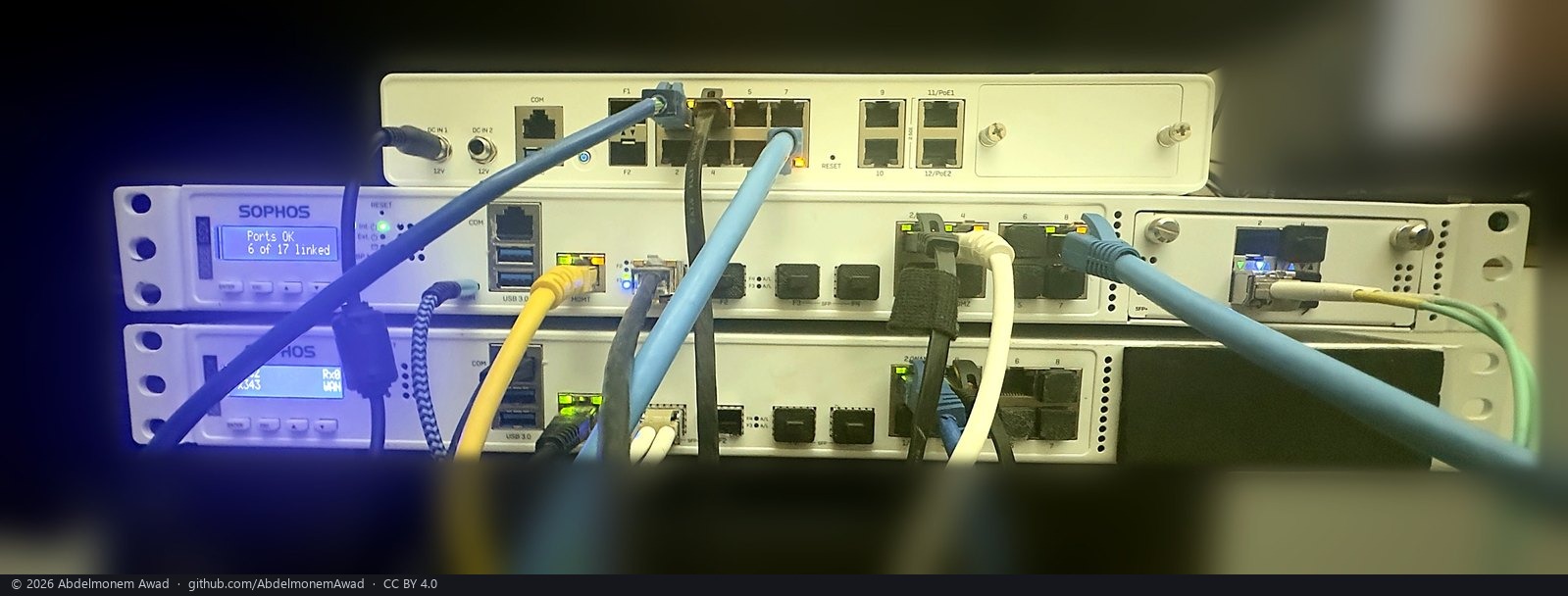
The XGS 136 at the top and the second XGS 3300 in the middle - the two of the table - photographed the same night; the first XGS 3300 below them took no part in this test.
| XGS 3300 (second unit, 4x10G module in bay A) | XGS 136 | |
|---|---|---|
| mark written | 2 min 54 s after the reboot: "assigned by the names on the chassis" | 2 min 02 s after the reboot, the same |
| WAN | Port2 (oxp3), a DHCP lease, the default route through it |
Port1 (npup1), a DHCP lease, the default route through it |
lan |
bridge0, 192.168.1.1/24, 15 members: F1, F2, Port1, Port3 to Port8, F3, F4 and the module's A1 to A4 |
bridge0, 192.168.1.1/24, 13 members: Port2 to Port12, F1, F2 |
| MGMT | igb0, 192.168.100.1/24 |
none - no host NIC |
| DHCP | dnsmasq on lan (.100-.199) and MGMT (.100-.199) |
dnsmasq on lan (.100-.199); Kea, which served the old hand-made bridge, off |
| rules | allow LAN to any and allow MGMT to any, IPv4 and IPv6 | allow LAN to any, IPv4 and IPv6 |
| from a PC on a bridge member | a lease in 192.168.1.100-199 on Port4; SSH and the GUI at 192.168.1.1 | a lease in 192.168.1.100-199 on Port3; SSH and the GUI at 192.168.1.1 |
| from a PC on MGMT | a lease in 192.168.100.100-199; SSH and the GUI at 192.168.100.1 | - |
| out through the WAN | DNS resolves, TCP 443 to the internet open | DNS resolves, TCP 443 to the internet open; the coprocessor's management link answers |
The countdown itself was not watched: neither appliance's console was on a serial line during these boots, so what shows that it ran out rather than being skipped is the mark and the log, which writes the plan before the countdown and the assignment after it.
What it does
A machine with OPNsense and this project installed comes up, at its first boot with the driver,
with every front port assigned to an OPNsense interface and named as the panel names it - Port1
to Port8, F1 to F4 on the XGS 3300 - one port as WAN and all the others joined in one
bridge as LAN, the layout of the bench box, without anyone at a keyboard. The console shows a
countdown while it waits; any key pressed during the countdown stops it, nothing is written,
and the assignment is made by hand the way OPNsense always offers it (the console menu, or the
GUI). Nothing is asked and nothing blocks: the box boots either way.
What is there today, read on the XGS 3300
- The driver's bring-up runs from
rc.syshook early, which/usr/local/etc/rccalls beforerc.bootup; the twelveoxpNdevices are up before OPNsense looks for them. rc.bootupcallsis_interface_mismatch()and, when the configured devices are missing, loops onset_networking_interfaces_ports(true)- an interactive assignment on the console that holds the boot until someone answers. That loop is OPNsense's manual way, and it stays.xgs_devices()insrc/etc/inc/plugins.inc.d/xgs.incregisters the^oxp[0-9]class, with nonames, so it invents nothing;get_interface_list()lists the ports as hardware.- The bench box was assigned by hand, port by port:
oxp0F1,oxp1F2,oxp2Port1,oxp3Port2 (WAN),oxp4tooxp9Port3 to Port8,oxp10F3,oxp11F4, the host's own NICigb0as MGMT, a bridge of nine ports as LAN. That is the reference the automatic result is compared with. - A panel port's tag is
0x8000 | (switch port << 8)- label 1 is0x8100, label 80x8800, F30x8900, F40x8a00(octeon-tx.md); F1 and F2 are the two cage ports on the coprocessor's own MAC. The driver holds every tag and publishes no name yet.
The rules
- An assignment that exists is never touched. The script fills what is unassigned and leaves the rest as it finds it, so a box set up by hand does not change when this is installed.
- Every front port gets an interface named by its label, enabled, with no address of its own.
- Port2 is WAN, on DHCP, when no WAN is assigned.
- Every other front port - Port1, Port3 to Port8, F1 to F4 - is a member of one bridge, and the
bridge is LAN:
bridge0,assigned as an interface namedLAN, on a private /24 of its own apart from the host NIC's -10.0.0.1/24is the default written in the script -lanitself on 192.168.1.1/24 since 2026-10-17, its DHCP server on, and the pass rule OPNsense gives a LAN, so a machine on any of the eleven ports gets an address and reaches the GUI. The host's own NIC stays what the installer made it - on the benchThe host's own NIC leavesigb0, thelanentry named MGMT on192.168.1.1/24, through which OPNsense and this project were installed - by rule 1; the bridge is anoptNentry named LAN beside it, as on the bench.lanfor an interface of its own named MGMT on 192.168.100.1/24, with a DHCP range and pass rules (2026-10-17).- The label comes from the driver, which has the tag, through one sysctl per port; a table per board in the test checks the driver, never the other way round.
- It runs once, at the first boot with unassigned front ports, with a 30-second countdown on the console; any key stops it. A marker says it ran or was stopped; after that it runs only when called by name.
- It backs up first and says what it did:
config.xmlcopied before the write, the write through OPNsense'swrite_config()(its own backup and revision), one log line per port. - It has a dry run that prints the plan - device, label, assigned now, to be done - and writes nothing.
The steps, in order
- The driver publishes each port's label. A read-only sysctl
dev.octep.0.port.N.label(Port1...Port8,F1...F4), derived from the tag and the cage ports' position. Built and tested on the appliance like every driver change. assign.php, besideboard.shinsrc/opnsense/scripts/xgs/. PHP, because the assignment lives inconfig.xmlandconfig.incowns the lock, the backup and the revision.--planprints the table and exits;--applymakes the assignment by the rules - the twelveoptNentries, thebridgedentry with its eleven members, theLANentry onbridge0with its address, DHCP range and pass rule, the WAN entry on Port2;--config <file>works on a copy for the tests;--names-onlymakes the twelve named entries and nothing else, for whoever wants another layout by hand.countdown.py, in the same directory. Opens/dev/console, printsXGS: assigning the front ports by their panel labels in N s - press any key to do it by handwith N counting down, returns 0 when the time runs out and 1 on a key. Thirty seconds.30-xgs-assign, insrc/etc/rc.syshook.d/early/beside the bring-up hooks. After the bring-up hook. On a boardboard.shknows, when a front port is unassigned and/var/db/os-xgs-npu/assignedis absent: run the countdown; on 0 runassign.php --apply, on 1 write nothing; write the marker with which of the two happened; log it; exit 0 on every path, so a failure leaves OPNsense's own prompt exactly where it was.- The tests, in this order. (a)
--planon the bench box's live config: "nothing to do, twelve of twelve assigned", and the labels equal to the descriptions there port for port. (b)--planthen--applyon a copy of that config with the twelveoxpNentries, the bridge and the LAN entry removed; the result compared with the hand-made assignment label by label - the bench bridge has nine members where the rule makes eleven, because F1 and Port8 were taken out of it there by hand for the lab, and that difference is the expected one. (c) On the bench box, the twelve entries removed under a backup and a reboot - once letting the countdown run out, once pressing a key - and the backup restored after each. (d) A fresh installation, the first one made after this exists. - The XGS 136. The same script with its labels - 1 to 8 behind its switch, 9 to 12 on the AQR412C, F1 and F2 (xgs136.md) - once its driver publishes them.
- The pages. This page stays as the design page; the README's "what works" gets one sentence; the measurements page gets the boot that assigned itself, with its console log.
What it never does
Touch an assignment that exists; wait without a countdown; invent a port that is not there; change how OPNsense assigns interfaces in general. One script, one countdown and one hook, for boards this project knows, filling what is empty with the names on the panel.
The discussion of this page is held in the project's GitHub Discussions. Showing it here loads giscus from giscus.app and GitHub, and writing in it needs a GitHub account - what that means.