Link Health
os-linkhealth · Appliance hardware
Watches every physical port and names the cable or transceiver going bad by the label printed on the chassis.
In the menu
- With os-xgs-npu installed: XGS: Link Health
- Without os-xgs-npu: Interfaces: Link Health
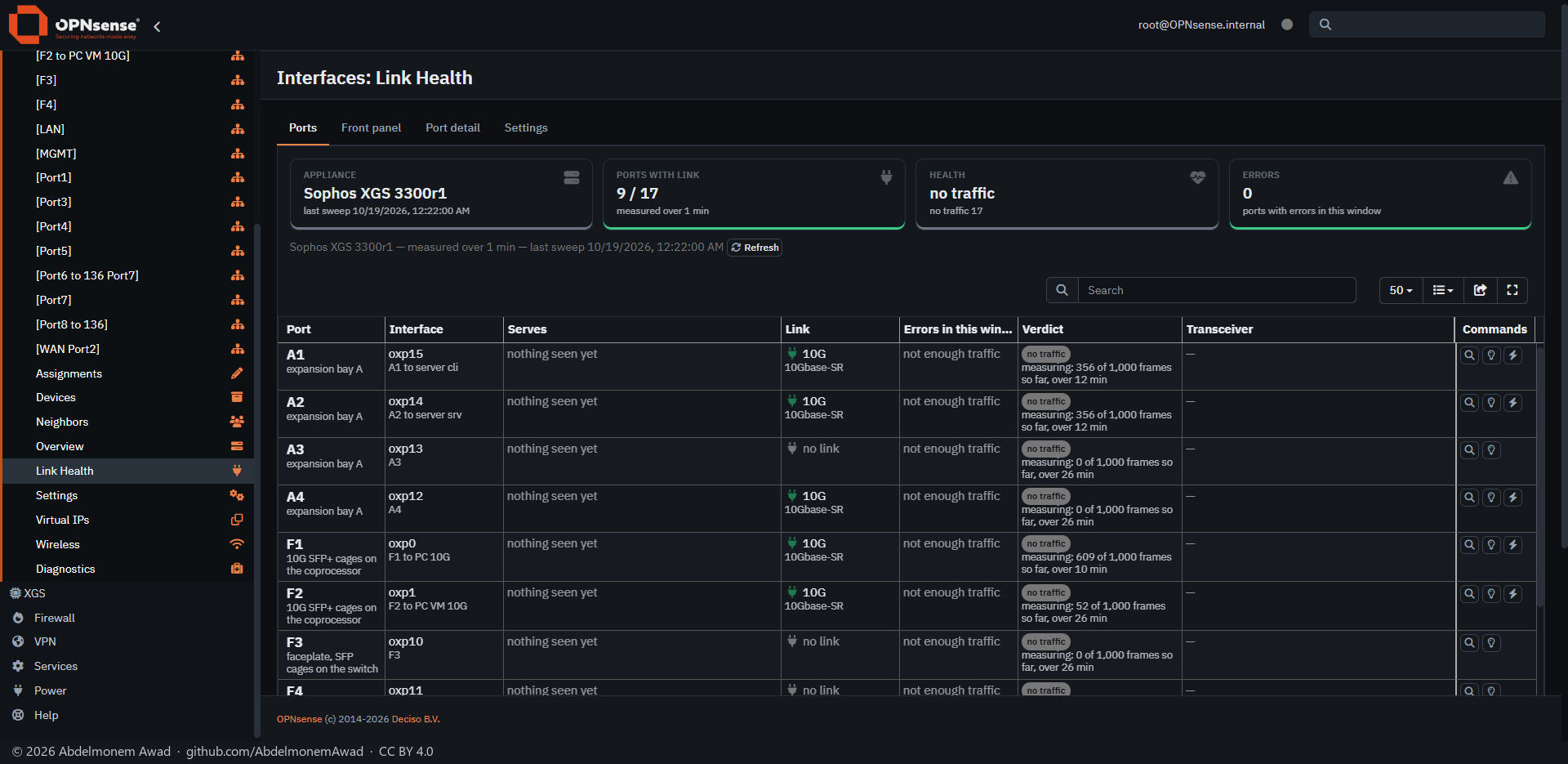
The verdict comes from the change in a port's hardware error counters over a window, never from optical readings. The plugin was written after a 10G fibre corrupted 3.81% of received frames while the link showed up and every reading of the transceiver was normal.
A port is down, disabled, idle, ok, watch, warn or fail. A quiet port stays idle - neither good nor bad - until it has carried enough frames to be judged, and a dark port is never an alert.
Ports carry the names printed on the chassis. On a Sophos XGS appliance with os-xgs-npu, the coprocessor's ports and the fitted expansion module are named at boot. The table covers 35 XGS boards and 14 FleXi modules; the XGS 3300, the XGS 136 and the XG 330 were checked socket by socket.
Features
-
Verdict per port
Errored frames per million over the window, a downshift below the fastest speed the port advertises, collisions on a full-duplex link, and link flaps in an hour.
-
Drawn front panel
The front of the appliance drawn from its layout, each socket coloured by its verdict. A layout nobody has checked against the metal says so on the page.
-
Identify
Blinks a socket's own LED, 30 seconds by default, without dropping the link, so the printed label and the interface name can be tied together. On Sophos XGS appliances the coprocessor's own tool blinks it.
-
Load test
For a port too quiet to judge: capped ICMP traffic to a neighbour already in that port's bridge table, then the counters compared. It fills the link while it runs.
-
Mail once
Warn and fail are mailed after two windows, once per port per cooldown (6 hours by default), at once when a port gets worse, and again when it recovers - through the mail settings OPNsense has for Monit.
-
Transceiver data
Type, vendor, part and serial number, temperature, voltage and receive power where the driver gives them - an advisory reason, never the verdict.
Install and update
On a Sophos XGS appliance it comes with the image from xgs-image-builder and is on after the first boot. Its new releases are installed by hand from the Plugins tab of XGS: Updates; nothing is updated on its own. Anywhere else, install the package attached to a release, or one built on the firewall with tools/make-package.sh, with pkg add; install/install.sh does the same without a package. Then open Interfaces: Link Health, or XGS: Link Health with os-xgs-npu installed, and give it two minutes: the first run only records a baseline.
Limits, and what is not tested yet
- All thresholds come from one appliance with igb and ix ports. The counter maps of every other driver are written from the driver sources and have not been run on hardware.
- Identify was tested on the igb and ix ports of the reference machine; other drivers have not been tested and may offer no button.
- Board entries generated from the vendor's files are marked unverified; only the XGS 3300, the XGS 136 and the XG 330 were checked socket by socket.
- No cable length or distance to a fault, no readings from the far end, and no transceiver data on em, igb or igc ports.
Repository
First release: 2026-10-16
The discussion of this page is held in the project's GitHub Discussions. Showing it here loads giscus from giscus.app and GitHub, and writing in it needs a GitHub account - what that means.