Fan Control
os-fanctl · Appliance hardware
Reads and records every temperature and fan of the appliance, and drives fans on a Super I/O chip that FreeBSD cannot control, handing them back to the hardware whenever anything goes wrong.
In the menu
- With os-xgs-npu installed: XGS: Fan Control
- Without os-xgs-npu: System: Fan Control
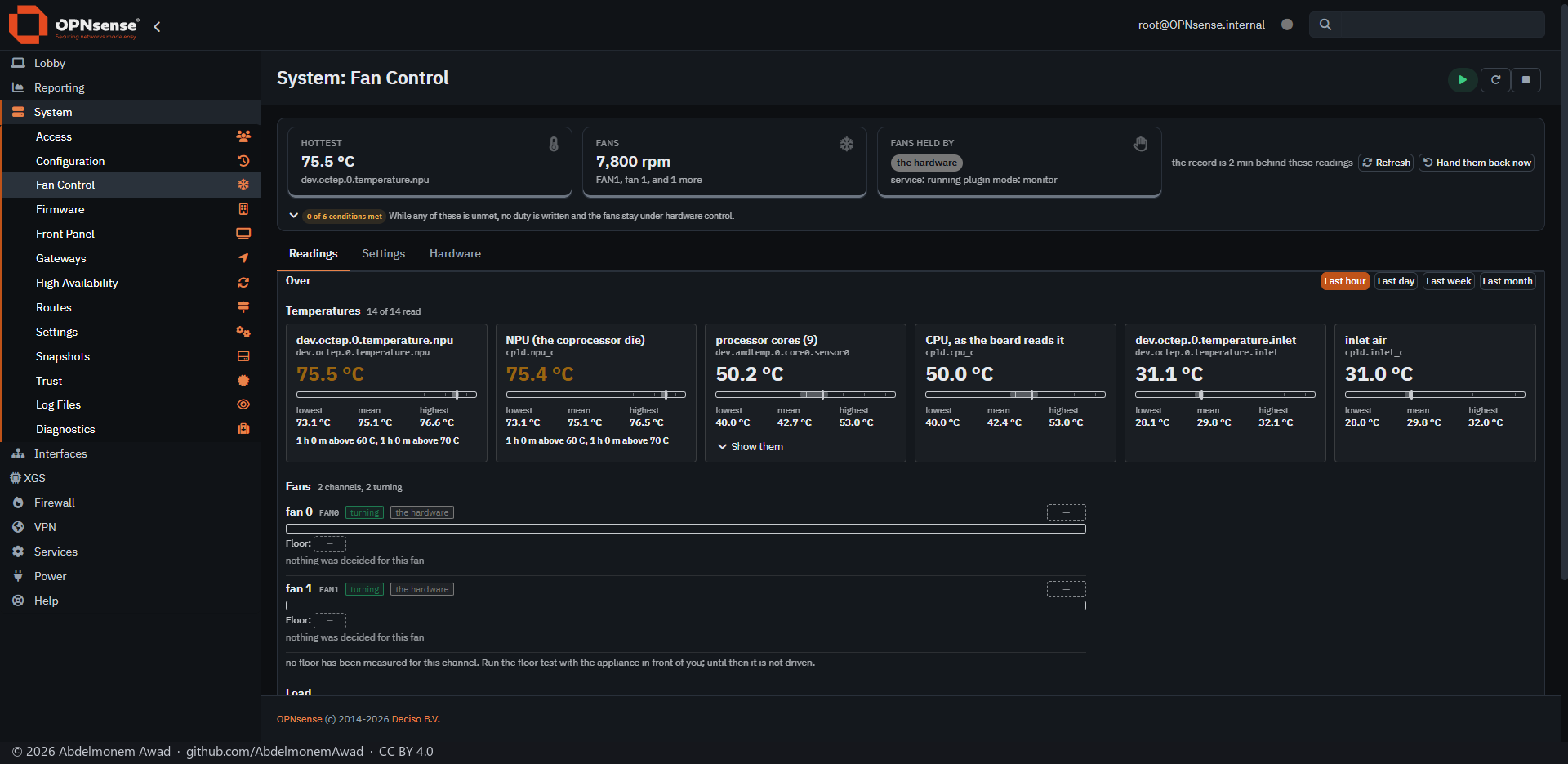
FreeBSD has no way to set a fan's duty on a Super I/O chip: every sysctl the ncthwm(4) driver registers is read-only. The plugin ships a small C helper, built on the firewall by its own compiler, that writes the chip's registers and does nothing else.
It finds the temperature sensors by asking the kernel which sysctl nodes are temperatures, so it also reads hardware it was never tested on. On the Sophos XGS 3300 it reads the board's own sensors - the CPU, the coprocessor die and the inlet air - and both fans, through a tool os-xgs-npu installs. There the fans are watched, not driven: the board gives the host no register to set them.
Nothing is controlled after installation. A channel is driven only when its floor - the lowest duty at which its fan still turns - was measured on that machine or it is held at a fixed 100%, and its fan reports turning. Every write is read back; a disagreement hands the fans to the hardware and stops.
Fan control was tested on one machine, an ex-Sophos XG 330 rev 2 with a Nuvoton NCT6779D, on OPNsense 26.7.4_1.
Features
-
Every sensor
Temperatures are found from the kernel's own declarations, not from a list of driver names. The page shows each one with its lowest, mean and highest over the chosen time, and every fan with its speed.
-
A record, once a minute
The lowest, the highest and the time-weighted mean over the last hour, day, week and month, and the time spent above each step of a fixed ladder. A sample costs 1.4 ms and the record stays under 503 KiB.
-
What more fan gives back
From before-and-after pairs around real duty changes it estimates how many degrees more fan buys, and says so when the effect is smaller than the sensors' rounding.
-
Six conditions before any write
The right chip, a table entry that permits control, the fans' original state captured, a measured floor or a fixed 100%, a turning fan and readable temperatures - all checked again before every decision.
-
Back to the hardware on every way out
A clean stop, an error, a signal, the watchdog, a stalled fan, a failed read-back, the panic temperature and package removal all end in a restore.
-
Dashboard widget
The fans and every temperature on the dashboard.
Install and update
On a Sophos XGS appliance it comes with the image from xgs-image-builder and starts in its watch-only mode: it writes to no fan chip until a curve is chosen. Its new releases are installed by hand from the Plugins tab of XGS: Updates; nothing is updated on its own. Anywhere else, run install/install.sh from a copy of the repository; running it again keeps the settings and the floor measurements, and its self-update.py installs a newer release. The page is System: Fan Control, or XGS: Fan Control with os-xgs-npu installed.
Limits, and what is not tested yet
- Driving fans is permitted only on the Sophos XG 330 rev 2, where it was exercised on the machine. The XGS 136 is read only so far, and other machines are read and reported until their floors are measured (docs/contributing-fans.md).
- On the XGS 3300 the fans cannot be driven: the board keeps its own fan curve, with no register the host can write.
Repository
First release: 2026-10-16
The discussion of this page is held in the project's GitHub Discussions. Showing it here loads giscus from giscus.app and GitHub, and writing in it needs a GitHub account - what that means.