Front Panel
os-frontpanel · Appliance hardware
Puts the firewall's own information on the LCD in the front of the appliance, through LCDproc, and gives the keys beside it something to do.
In the menu
- With os-xgs-npu installed: XGS: Front Panel
- Without os-xgs-npu: System: Front Panel
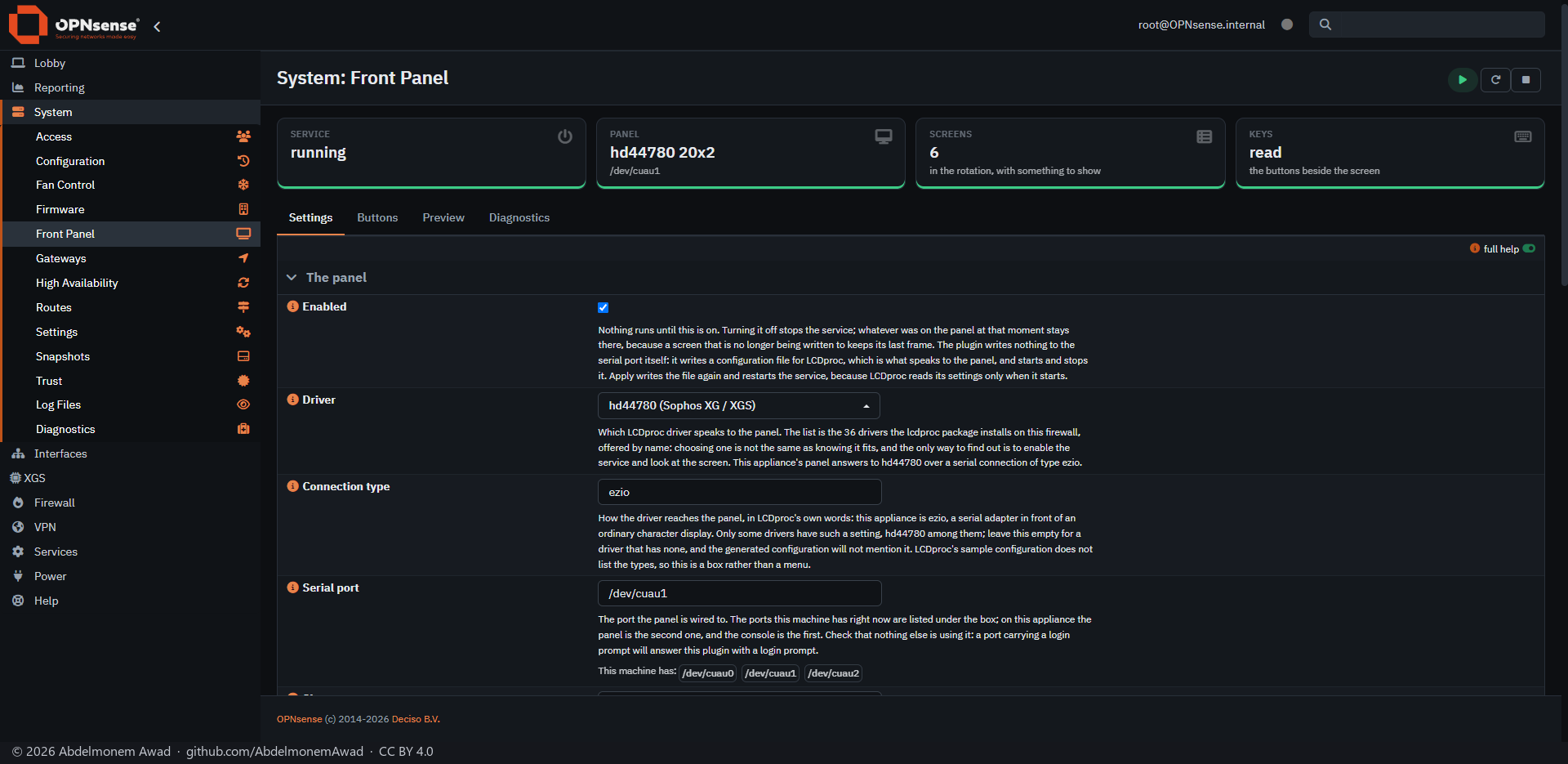
The plugin writes no display code. LCDproc, from OPNsense's own repository, drives the panel; this plugin decides what the screens say, writes LCDd's configuration from its settings page and runs its own service.
On the Sophos XGS 3300 the panel's bridge carries out no positioning command, so the plugin draws that panel itself, forty characters at a time, and reads its keys from the same port.
Nothing runs until it is turned on. When the page opens, it looks the appliance up in its table and proposes a driver and its settings; nothing is applied until Apply is pressed. A serial port that carries a login prompt is refused.
The screens are in English whatever the GUI language is: a character LCD has no Arabic letters, and anything outside ASCII is folded before it is sent. The preview shows what folding changed.
Features
-
Screens you choose
Identity, WAN, throughput, system, temperature, a message of your own, and the worst port from os-linkhealth when that plugin is installed, in the order you set.
-
Speeds on the page
Seconds per screen, scroll speed, bus delay, full redraw and the heartbeat are settings, each written into LCDd's configuration.
-
Keys and a menu
Each key's action is set on the Buttons tab. The panel's own menu has System, Network, Screens and Power; Reboot and Shutdown need a two-step confirmation and are written to the system log.
-
Learns a panel's keys
Learn the codes from the panel asks for each key on the glass and keeps what it hears, for panels that send their keys without being asked.
-
Preview and Diagnostics
Preview shows every screen as the panel would draw it now. Diagnostics shows the service, the keys, the serial ports and which one carries a login prompt, and sends a test line to the panel.
Install and update
On a Sophos XGS appliance it is in the image from xgs-image-builder only when the build page's Front panel is yes - a rack model such as the XGS 3300; a desktop such as the XGS 136 has none - and it is turned on where the plugin's table has a confirmed entry for the model. Its new releases are installed by hand from the Plugins tab of XGS: Updates; nothing is updated on its own. Anywhere else, install the package attached to a release, or one built on the firewall with tools/make-package.sh, with pkg add; it brings LCDproc as a dependency, and install/install.sh does the same without a package. Then open System: Front Panel, or XGS: Front Panel with os-xgs-npu installed.
Limits, and what is not tested yet
- Two panels are confirmed: the Sophos XG 330 rev 2 and the XGS 3300. The other drivers LCDproc installs are offered as a choice, not tested.
- Whether another program already holds the serial port is not checked; fstat answers that (docs/panels.md).
Repository
First release: 2026-10-16
The discussion of this page is held in the project's GitHub Discussions. Showing it here loads giscus from giscus.app and GitHub, and writing in it needs a GitHub account - what that means.