Right-to-Left Layout
opnsense-rtl · Language
Lays the OPNsense GUI out right to left when its language is Arabic or Persian, and leaves every other language untouched.
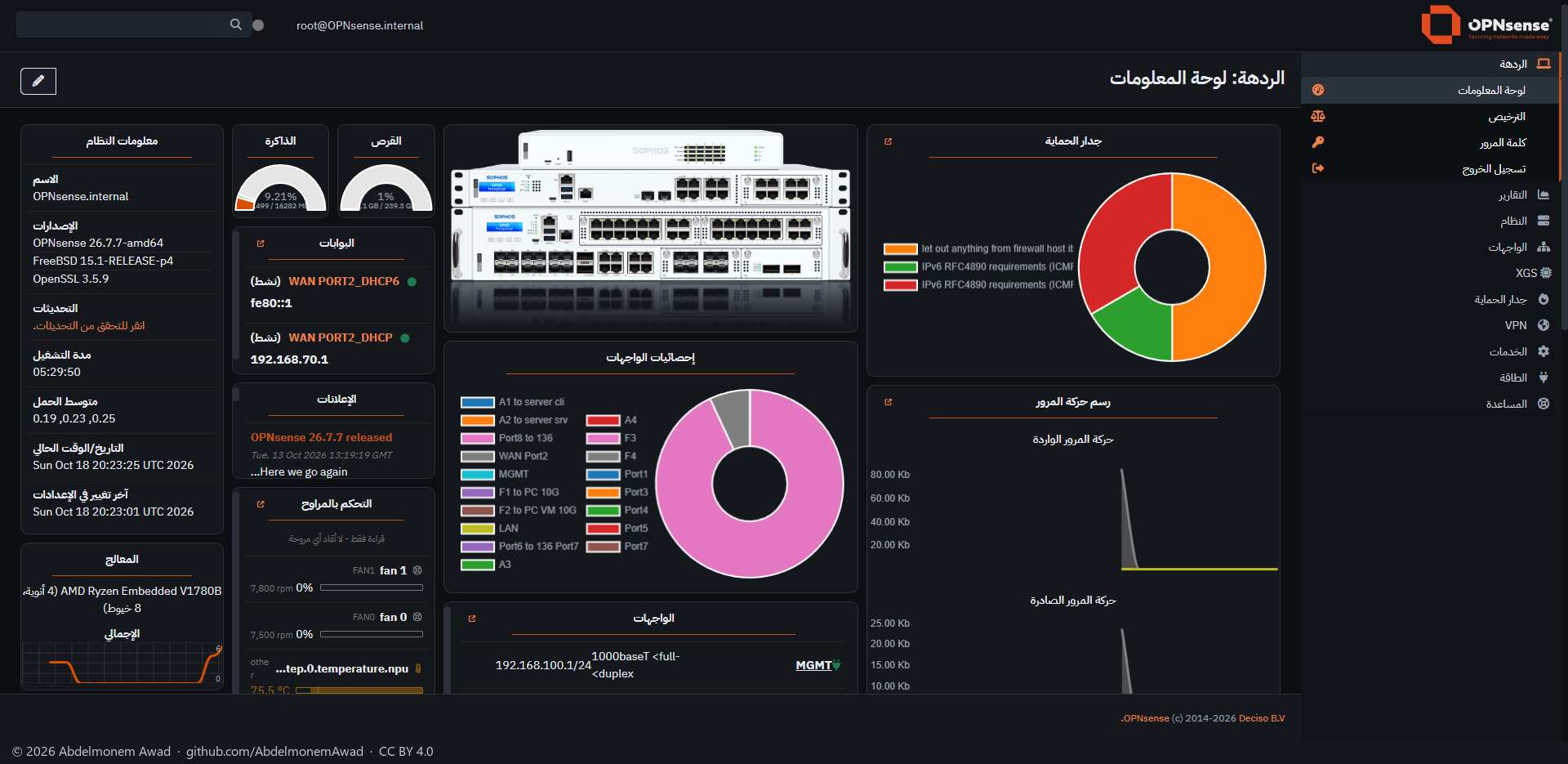
A translated GUI keeps a left-to-right layout: the menu on the left, tables and forms aligned left, dropdowns opening the wrong way. This plugin mirrors it.
The page templates get a right-to-left direction and load a mirrored copy of each stylesheet. The copies are written beside every stylesheet of the GUI and its themes, with the horizontal geometry flipped; a few manual rules keep chart text and fields that hold addresses and commands left to right.
The aim is to propose this to OPNsense itself - the direction in the templates, and mirrored stylesheets built with the themes; until then this repository is the testing ground.
Features
-
Mirrored stylesheets
Left and right in properties and values, four-value shorthands, corner radii, horizontal translate() values and resize cursors are flipped. Icon fonts are not.
-
Components left alone
A rule whose selector already names a direction belongs to a component that lays itself out right to left, such as Tabulator's tables, and is not mirrored.
-
Every installed theme
A mirrored copy is made for each installed theme, XGS Silicon among them.
-
Kept across updates
A pkg trigger applies the changes again the moment an update writes a template or a stylesheet, and a boot hook does the same at every boot.
-
Careful patching
Pristine copies of the three templates are kept before they are changed; a patched template that does not compile is put back and the installer stops.
-
Column titles
A short script forgets the column titles a browser kept from another language - only the titles, not the widths or the columns shown.
Install and update
On a Sophos XGS appliance it comes with the image from xgs-image-builder and is applied; it shows only when the GUI language is Arabic or Persian. Its new releases are installed by hand from the Plugins tab of XGS: Updates; nothing is updated on its own. Anywhere else, run install.sh as root from a copy of the repository, then reload the GUI with Ctrl+F5 so the browser drops the cached stylesheets. uninstall.sh restores the original templates and removes the mirrored stylesheets, the trigger and the boot hook.
Limits, and what is not tested yet
- Tested on OPNsense 26.7 with the opnsense-dark theme; the mirrored stylesheets of the other themes have not been checked page by page.
- Experimental: it covers the pages in daily use; not all of the GUI's several hundred pages have been checked.
Repository
First release: 2026-10-16
The discussion of this page is held in the project's GitHub Discussions. Showing it here loads giscus from giscus.app and GitHub, and writing in it needs a GitHub account - what that means.